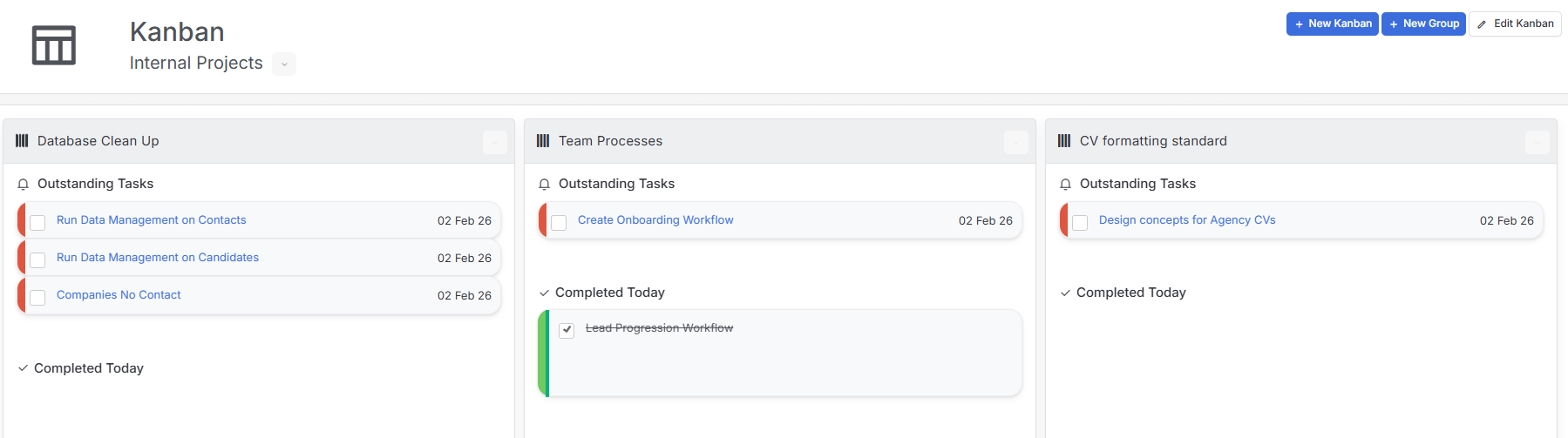
Tasks have a habit of getting lost in a list. Kanbans give them a home. Each task becomes a card that moves across columns as it progresses, so you and your team can see where everything stands at a glance.
How it works
Find Kanbans in the Home group of the Menu Bar and create a new board.
Add groups to act as the stages of your workflow, for example “Drafting”, “In Review” and “Submitted”.
Add tasks to a group, then drag them from stage to stage and tick them off when done.
Share the board with colleagues so everyone works from the same view.
Little-known shortcut
Creating a Task from anywhere in itris X? Select your Kanban board on the Activity screen and the task lands straight on the board.
Great for
Tender responses, GDPR retention reviews, contractor onboarding, or team learning plans.
Top tip
Keep it simple. Start with a few groups that mirror your real process, then refine as you go.