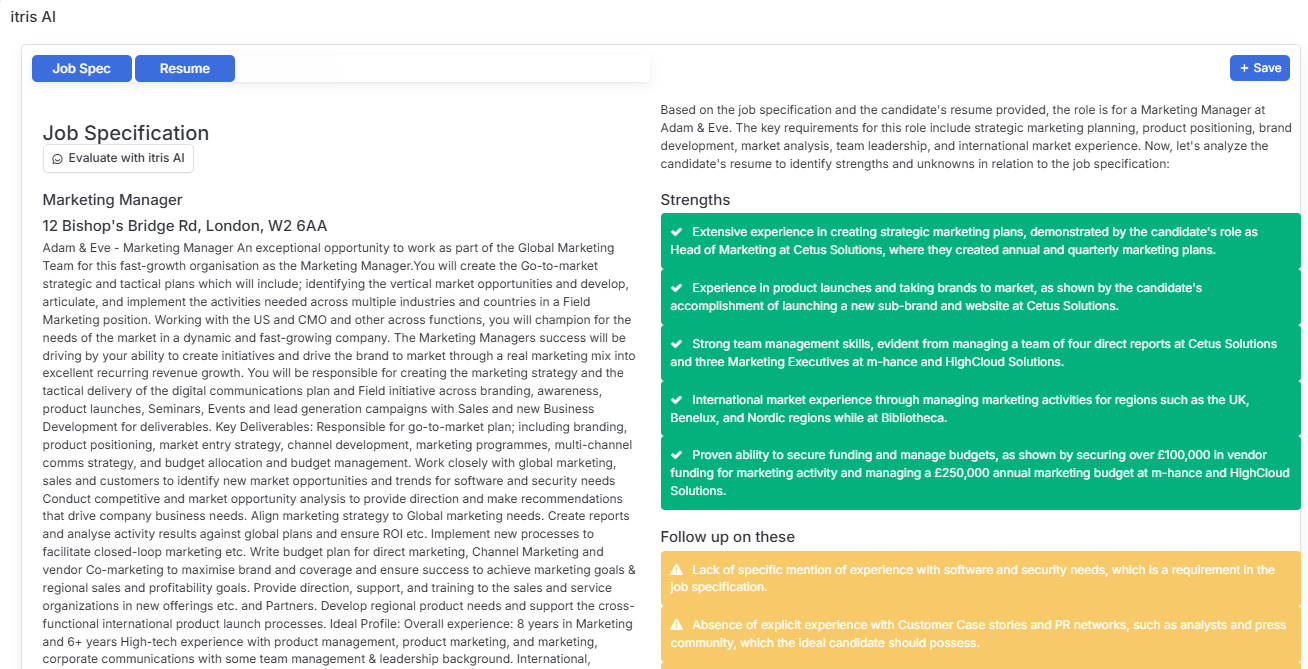
Save time shortlisting by letting itris AI do the first pass of analysis for you - available from both the Longlist and Shortlist areas of any job record.
How to access it
From the candidate’s dropdown menu on the job records Longlist or Shortlist blocks, itris AI sits at the top of the list. Selecting it opens the candidate’s Quick View on the itris AI tab (you can also get here directly from Quick View itself).
Evaluate with itris AI
Once you’re on the itris AI tab, use the Job Spec or Resume buttons to run “Evaluate with itris AI.” This compares the candidate directly against the job spec and highlights their key strengths, plus any areas worth following up on before you progress them further.
While you review the results, you can view the job spec or resume side-by-side on the right - so you’re never flicking between screens to check details.
Keep a record
Happy with what you see? Save the evaluation as an Activity against the candidate record, so it’s there to revisit any time - no need to re-run the analysis later.