
Introduction
Getting started with linking records is super flexible - you can kick things off from either the candidate or contact record, whichever one you happen to be looking at first. The system is smart enough to know where you’re starting from and will adjust the options accordingly.
Please see the article Tools & Settings | Contact Settings for options on linking activities between linked records.
Starting the Link Process
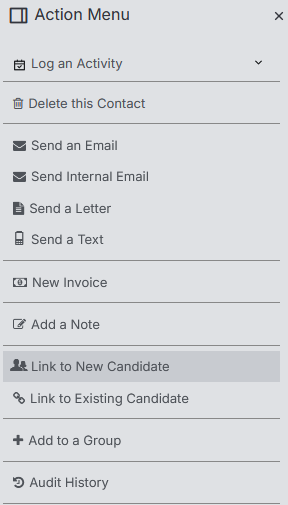
Once you’re on your chosen record, head over to the Action Menu where you’ll find your linking options. The menu will show you the appropriate choices based on where you started:
- Link to Existing Candidate/Contact - Use this when you want to connect to someone who’s already in your system
- Link to New Candidate/Contact - Perfect for creating a brand new record and linking it in one go
Creating New Links
When you choose “Link to New,” the system will create a fresh candidate or contact record (depending on what you need) and automatically establish the connection. You’ll then want to fill in any additional fields to complete their profile - think of it as setting up their details properly so you don’t miss anything important later.
Linking to Existing Records
If you’re going with “Link to Existing,” you’ll need to add in the details of the record you want to link to. This is where you’ll search for and select the person you want to connect with your current record.
Need to Unlink?
Sometimes you need to break the connection, and that’s totally fine. To unlink records, go back to “Link to Existing,” start typing something in the search field, then simply choose “NONE” from the dropdown. This cleanly separates the records without any hassle.
Linked CV History
On the Contact Record, once it is linked with the Candidate, the Linked CV History block will reflect CV History Block on the Candidate record, giving you an overview of their work history without having to navigate to the Candidate record.
If you don’t see this block it may need to be added to your Layout, see the article Tools & Settings | Layout Designer for more information.