
Introduction
itris includes a built-in Kanban board feature that helps you manage tasks visually and collaboratively. A Kanban board is a visual workflow management tool that displays tasks as cards that you can move through different columns, with each column representing a stage in your process. Think of it like a digital version of sticky notes on a wall – but much more powerful and shareable with your team.
The beauty of Kanban boards in itris is their flexibility – you can adapt them to match any workflow or process that makes sense for your team. Start with a simple structure and refine it as you go!
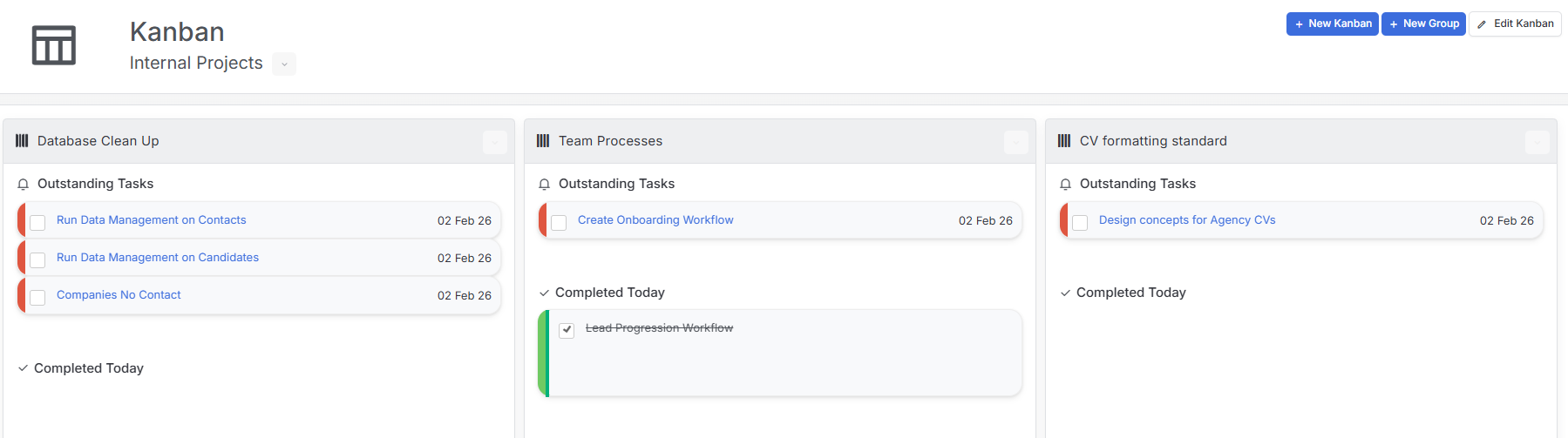
Getting Started with Kanban Boards
You’ll find Kanban boards in the Home group within the Menu Bar. This is where you can access your existing boards and create new ones.
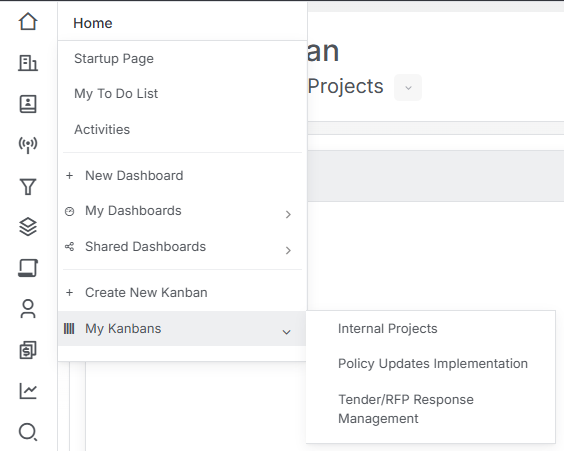
Creating and Sharing Kanban Boards
There are a couple of ways to create new Kanban boards:
- From the Menu Bar: Create a new Kanban board directly from the Home group
- From within an existing Kanban: You can also create additional boards while you’re already working in a Kanban
When you save a new Kanban board, you’ll have the option to share it with other users in your organization. This means you can have separate boards for different teams, projects, or workflows – whatever works best for how you like to organize your work.
If you’ve already created a Kanban and want to share it later, no problem – you can edit an existing Kanban at any time to add or change who has access to it.

Working with Groups and Tasks
At the top of your Kanban board, you’ll see buttons for adding new groups. Use these to create the columns that represent your workflow stages.
Each group also has an edit button in the top right, allowing you to modify the group settings as your needs change.
Within each group, you’ll find a button in the top right corner where you can add tasks.
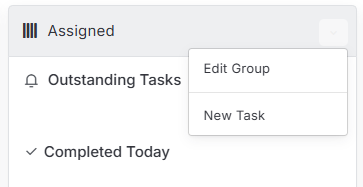
Here’s something useful to know: these tasks are actually Activities with the type “Task” in itris. This means you can add them to your Kanban when creating a task anywhere in the system – just select the relevant Kanban board in the Activity screen.
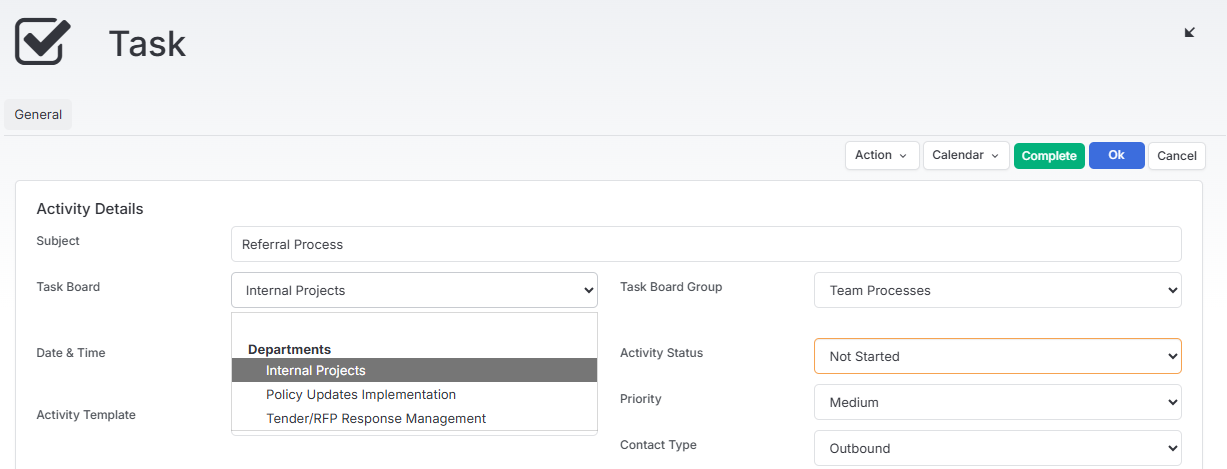
Moving Tasks Through Your Workflow
The real power of Kanban boards comes from their visual, interactive nature:
- Drag and drop tasks between groups as they progress through your workflow
- Tick tasks as completed when they’re done
- See at a glance where everything stands in your process
Practical Use Cases
Kanban boards work brilliantly across different departments and scenarios. Here are some ways teams use them in itris:
Compliance and Operations
GDPR Data Retention Reviews: Create a workflow like “Records to Review → Candidate Contacted → Consent Renewed/Declined → Data Archived/Deleted → Documented” to manage those regular cleanup cycles that can’t be automated. This helps you stay on top of data protection requirements without things slipping through the cracks.
Training & Certification Tracking: Keep staff compliance training organized with stages like “Due This Month → Booked → Completed → Certificate Filed → Next Renewal”. This is especially valuable for mandatory training such as anti-bribery, data protection, or diversity training where you need clear visibility of who’s up to date.
Policy Updates Implementation: When regulations change, track the rollout process: “New Regulation Identified → Impact Assessment → Policy Draft → Team Training → Rollout → Compliance Check”. This ensures nothing gets missed when implementing important policy changes.
Business Development
Tender/RFP Response Management: Manage your tender responses with a board like “RFPs Received → Go/No-Go Decision → Assigned → Drafting → Review → Submitted → Outcome”. These often involve multiple stakeholders beyond just the BD team, and a Kanban board keeps everyone aligned.
Marketing Campaign Execution: Track campaigns from concept to completion: “Campaign Ideas → Content Creation → Approval → Scheduled → Live → Results Analysis”. Perfect for sector-specific campaigns, events, and webinars.
Client Feedback Loop: Ensure client feedback leads to action with stages like “Feedback Received → Categorized → Action Required → Assigned Owner → Implemented → Client Notified”. This shows clients you’re listening and acting on their input.
Resourcers and Recruiters
Internal Projects: Those operational improvements that often get deprioritized – like database cleanup, CV formatting standards, team process improvements, or technology adoption – benefit from having their own visible workflow where progress is tracked.
Contractor Onboarding (Non-Placement): Manage the administrative workflow after placement has been made: “Timesheets Setup → Payroll Briefing → Client Induction Arranged → Week 1 Check-in → Ongoing Support”. This catches all those important tasks that can fall between systems.
Learning & Development Planning: Create personal or team development boards to track skills growth: “Skills to Develop → Resources Found → In Progress → Practiced → Mastered”. This makes professional development visible and trackable.