
Introduction
Whether you’re dealing with healthcare professionals who need multiple certifications, construction workers requiring safety tickets, or simply ensuring everyone has the right paperwork to work legally, itris gives you a flexible system to track it all in one place.
Compliance Items
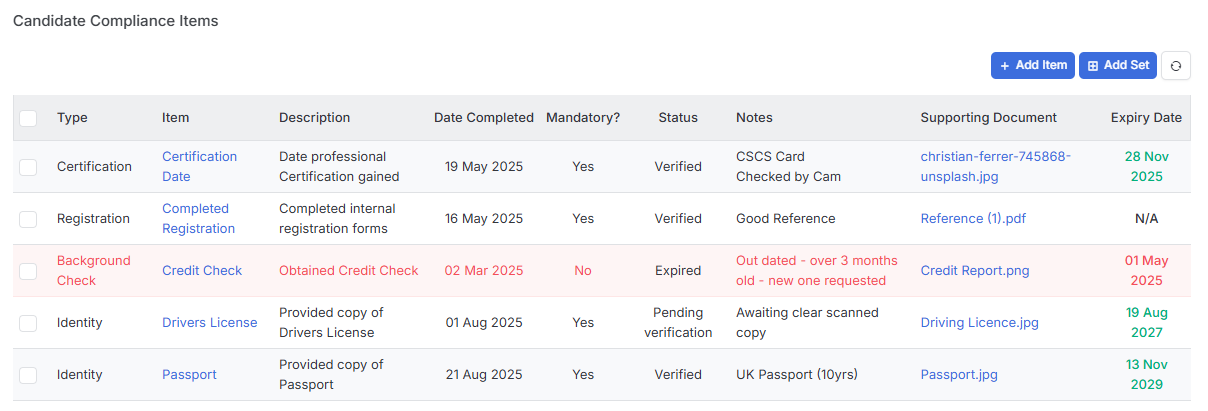
Compliance Items are created in Tools & Settings | Candidate Settings. There are 6 different Compliance Item Types, and each one can be set up as either a simple Yes/No checkbox or a date field:
- Background Check
- Certification
- Checklist
- Identity
- Permit
- Registration
In addition to the Type, each Compliance Item can be named and a descriptions added, so they make sense for your specific requirements.
Adding Compliance
If a Compliance Items is set as mandatory, they’ll automatically appear on every new candidate record you create, which saves you from having to remember to add them later.
Compliance Items can manually be added to a Candidate record via the Add Item button to add individual items or via the Add Set to add all the items assigned to a Compliance Set. Compliance Sets are predefined groups of compliance items, see the Tools & Settings | Candidate Settings article for further details.
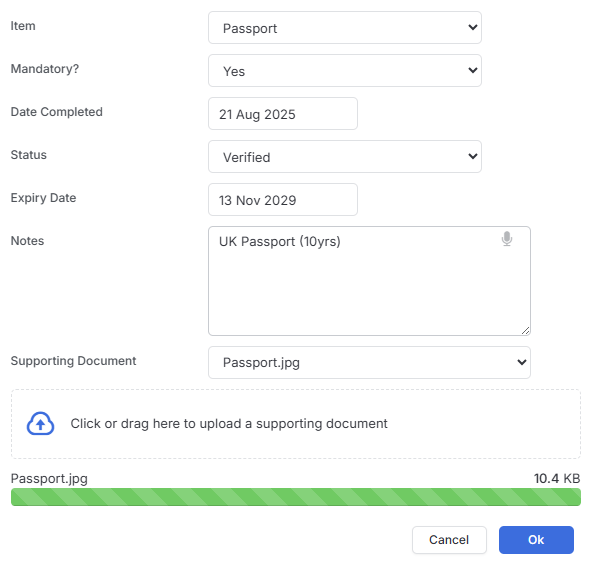
When adding individual items or editing those added via Compliance Sets you can set the Date Completed, Date Expired (if a Date Compliance item rather than a Yes/No), Status (e.g. Verified, Pending Expired etc), add notes and choose either an existing attached document from the drop down or upload a new supporting document.
Any documents you attach for compliance purposes will automatically be stored in the General folder within the candidate’s Documents section. There’s a handy link in the added Compliance Items list that lets you open these in a pop-out panel, so you can view them without losing your place in the main record.
Permissions and Control
itris lets you control who can add new compliance items and who can make changes to existing ones through its permissions system. This means you can keep sensitive compliance data secure while still giving your team the access they need to do their jobs.
See the article Tools & Settings | User Groups for more details.
Reporting and Monitoring
You can use the Reporting suite in itris to create and run reports to identify things like expired compliance items or documentation that’s still unverified or pending review. This makes it much easier to stay on top of your compliance obligations and ensure nothing slips through the cracks.